
What can we help you with?
Add Email CC In The JS Help Desk!
Add Email CC
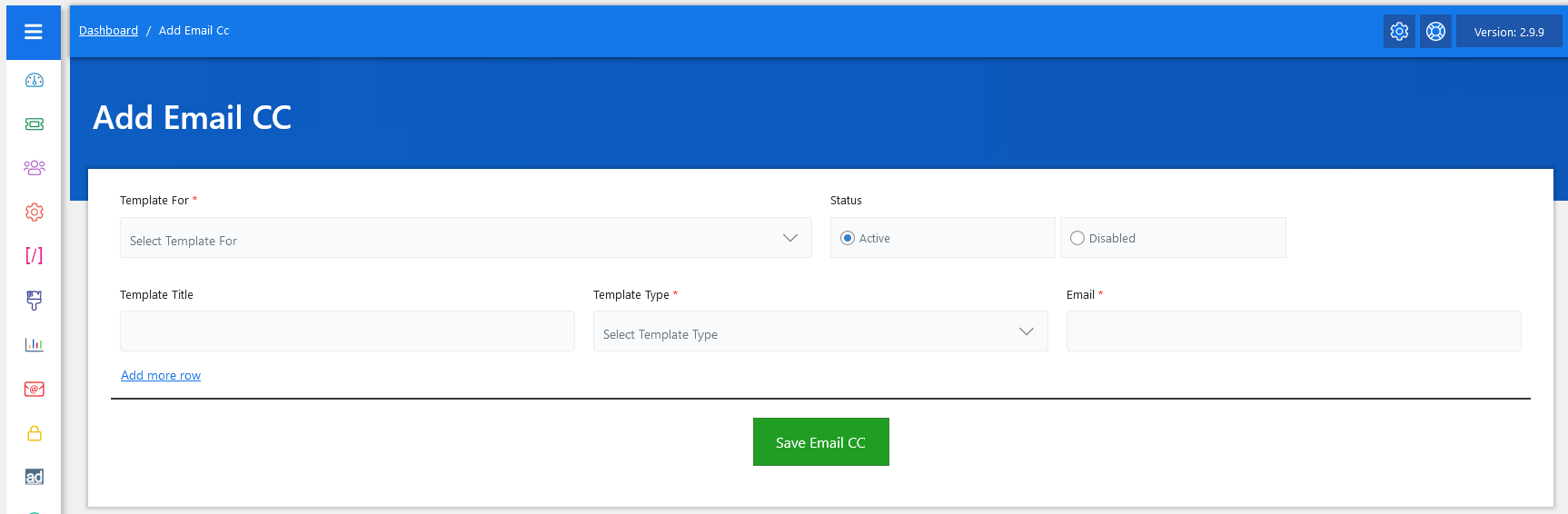
Now, let’s walk through the step-by-step process of adding an email template from the admin end. From your admin dashboard, navigate to the Admin Dashboard > Dashboard Menu > Add Email CC > click on the Add Email CC button to start adding email templates effectively. On the ‘Add Email CC’ form, we will provide all the necessary details for adding email templates.
- Template For: When adding an Email CC, the first step is to select the Template For option. This determines which ticket event or email notification the CC will apply to. Select the template from the combo box. For example, you might choose Ticket Reply, New Ticket Creation, or Close Ticket.
- Status: The Status option allows you to set the rule as either Active or Disabled. Active means the CC rule is currently in use, and emails will be copied as defined. Disabled means the rule is saved but temporarily inactive, so emails will not be copied until you reactivate it.
- Template Title: You can also assign a Template Title to make it easier to identify the purpose of the Email CC later.
- Template Type: The next important field is Template Type, where you can choose between CC and BCC. If you select CC, the additional recipient will be visible to the main email recipient. For example, if you CC the billing team in a Close Ticket email, the customer will see that the billing team is copied. On the other hand, if you select BCC, the copied recipient will remain hidden from the customer. This is especially useful when an admin wants to monitor communication discreetly.
- Email: The Email field is where you enter the recipient’s email address.
- Add Row More: You can add multiple templates by using the Add more row option.
After filling in all the relevant fields, simply click the green “Save Email CC” button at the bottom of the form. The system will validate the inputs and create the new email cc with the template. If any required information is missing or incorrect, a notification will alert you to fix it before submission.