
Erase Data Requests In The JS Help Desk!
Erase Data Requests
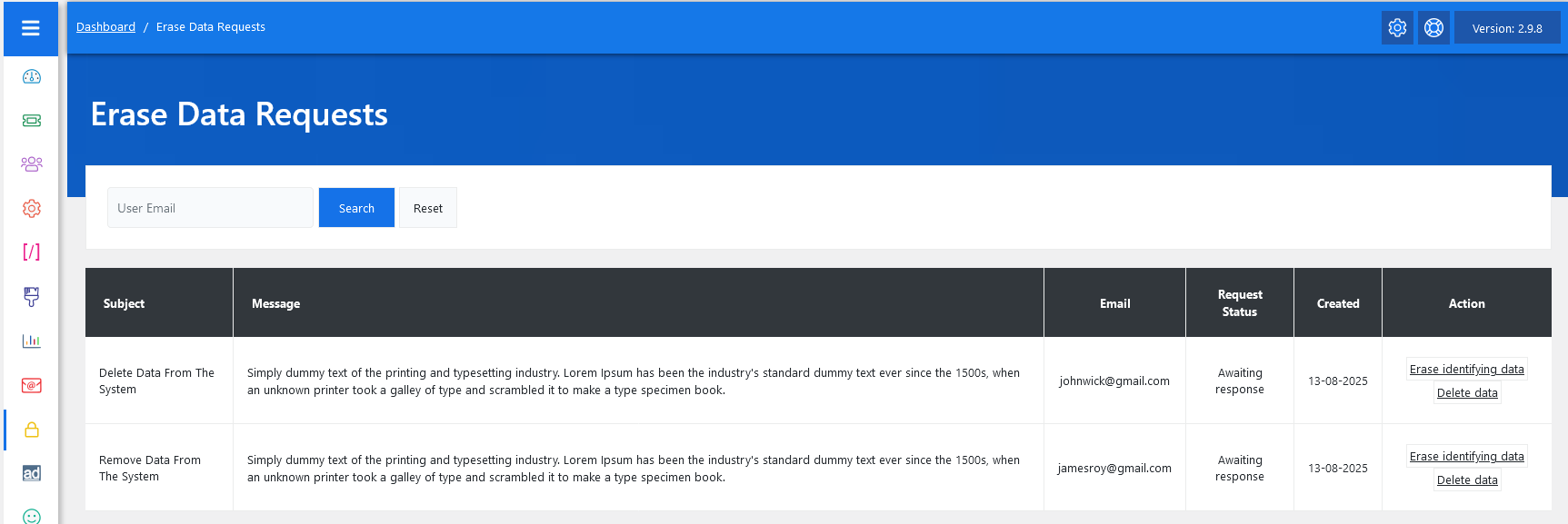
From your admin dashboard, navigate to the Admin Dashboard > Dashboard Menu > Erase Data Request. On the Erase Data Requests page, you will find various options for the admin to manage the requests. All details about erase data requests and how the admin manages them are discussed here.
The Erase Data Requests feature in JS Help Desk allows administrators to manage and process user requests to remove their personal information from the system. This is a crucial tool for complying with data privacy regulations, such as the GDPR (General Data Protection Regulation). When a user submits a request, it is logged in this section for review, ensuring that no request is overlooked. The administrator can then decide whether to erase only identifying information or completely delete all associated data, depending on the request.
Search

At the top of the interface, there is a search bar where you can enter a user’s email to filter the results. This makes it quick to locate specific requests, especially if your system handles multiple incoming requests daily. For example, if a user named James Roy has sent in a data erasure request, you can simply type jamesroy@gmail.com in the search bar to view only his request. The Reset button clears any filters and displays all pending and processed requests.
Listing

Each request is listed in a table format for easy review. The table includes the Subject of the request (e.g., “Delete Data From The System” or “Erase Data From The System”), a detailed Message from the user explaining their request, their Email, the current Request Status, the date it was Created, and an Action column for administrators.
There are usually two available actions:
- Erase Identifying Data
- This removes all personal identifiers from the user’s tickets while keeping non-identifiable records for reporting or compliance purposes. For example, a ticket might remain for statistical analysis, but names and emails are removed.
- Delete Data
- This permanently removes all user information, including related tickets, attachments, and records, from the system.