
FAQ’s In The JS Help Desk!
FAQ’s
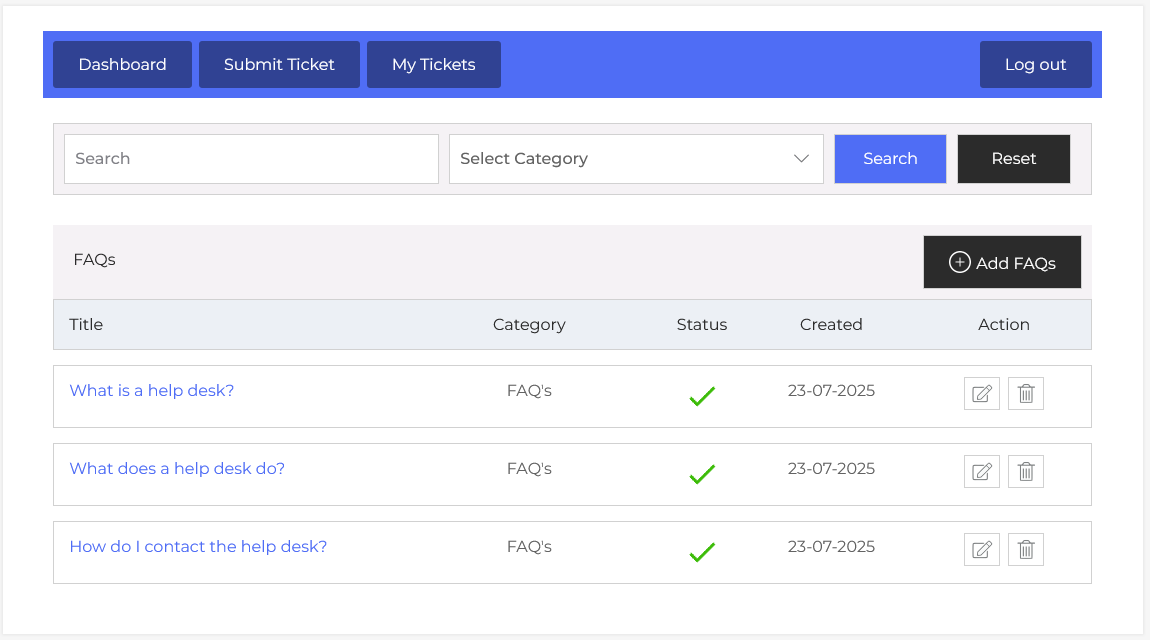
From your agent dashboard, navigate to the Agent Dashboard > Dashboard Menu > FAQ’s. On the faq’s page, you will find various options for the agent to manage the faq. All details about the faq and how the agent manages it are discussed here.
Search

You can use the search filter to find the faq quickly. You can search by FAQ Title or select a specific Category. Simply choose a category from the dropdown, and clicking on the Search button will display the faq’s corresponding to that criterion. The Reset button clears the filters and restores the full list of faq’s.
Listing
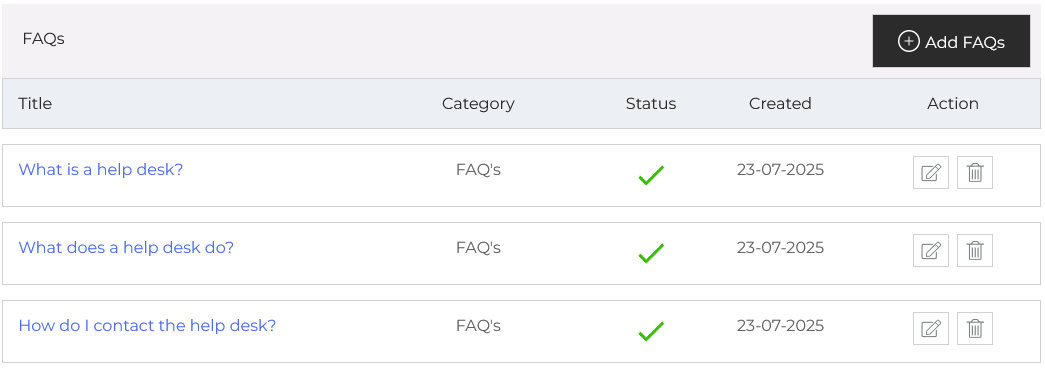
Here, agents can view existing faq’s and organize them by categories. Each faq has metadata like a title, category, status, created date, and action buttons for editing or deleting. For example, you might have faq’s titled “What is a help desk?” “What does a help desk do?” and “How do I contact the help desk?” each help users solve specific problems without opening a support ticket.
- Title: Name of faq’s.
- Category: This shows the faq belongs to which category.
- Status: A green checkmark means the article is active and visible to users.
- Created: It represents the creation date of the faq’s.
- Action: You can update or delete the faq anytime using the action buttons on the right side.
Additionally, there’s an option to “Add FAQ” at the top right of the “FAQ’s” page.