
Agent Permissions In The JS Help Desk!
Permissions
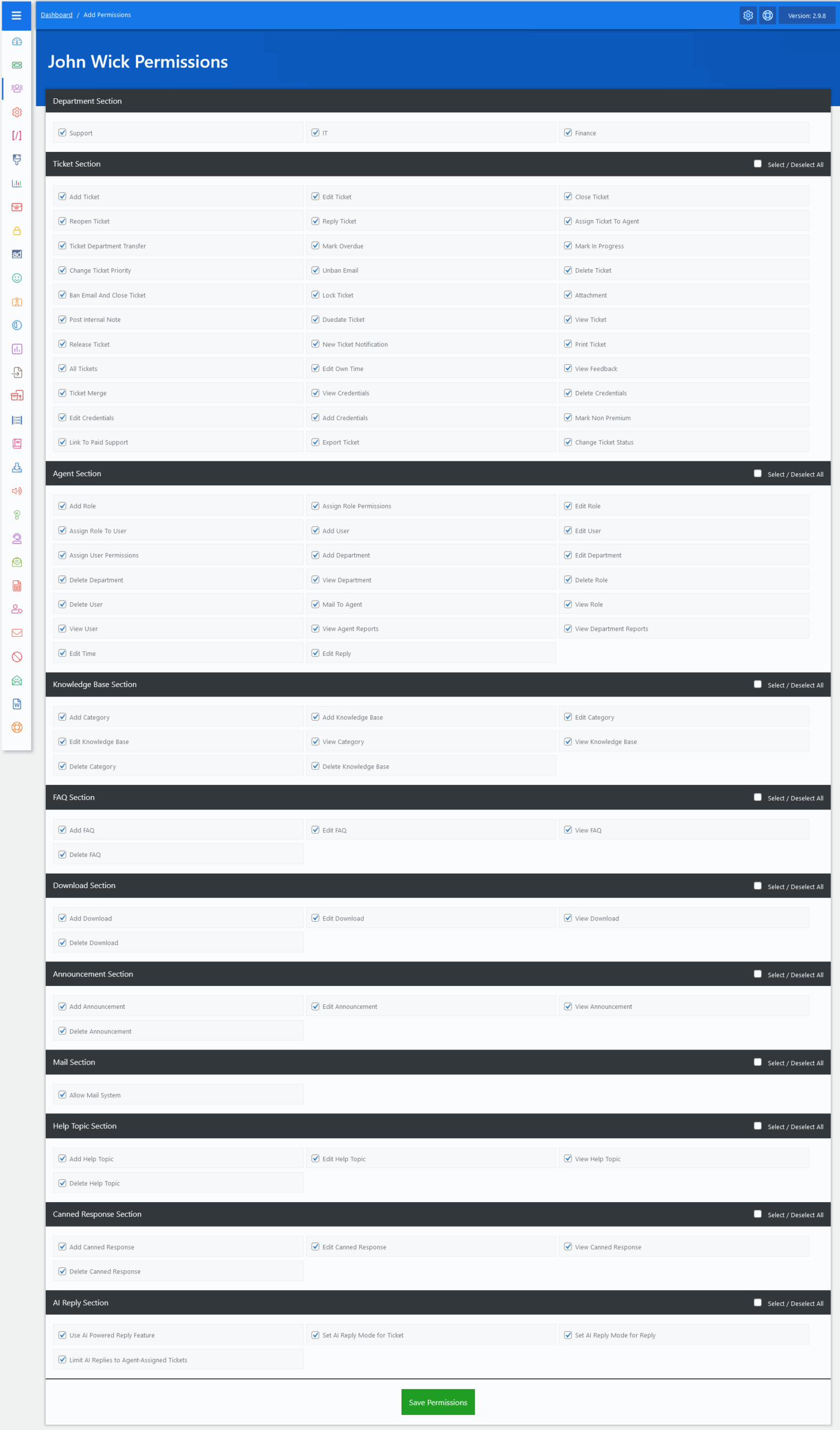
The Agent Permissions feature in JS Help Desk is a robust system that enables administrators to define and control the capabilities of each agent within the help desk environment. This flexibility ensures that every team member is given access to only those features and actions necessary for their specific role.
Department Section

At the top of the permission screen, we see the list of departments that exist in the system. We begin with the Department Section, where an agent can be assigned to one or multiple departments, such as Support, IT, and Finance. This assignment directly affects which tickets the agent can view and manage.
For example, if “John Wick” is assigned to the Support and IT departments, he can only work on tickets from these departments. This is especially helpful for large organizations with multiple departments operating independently.
Ticket Section
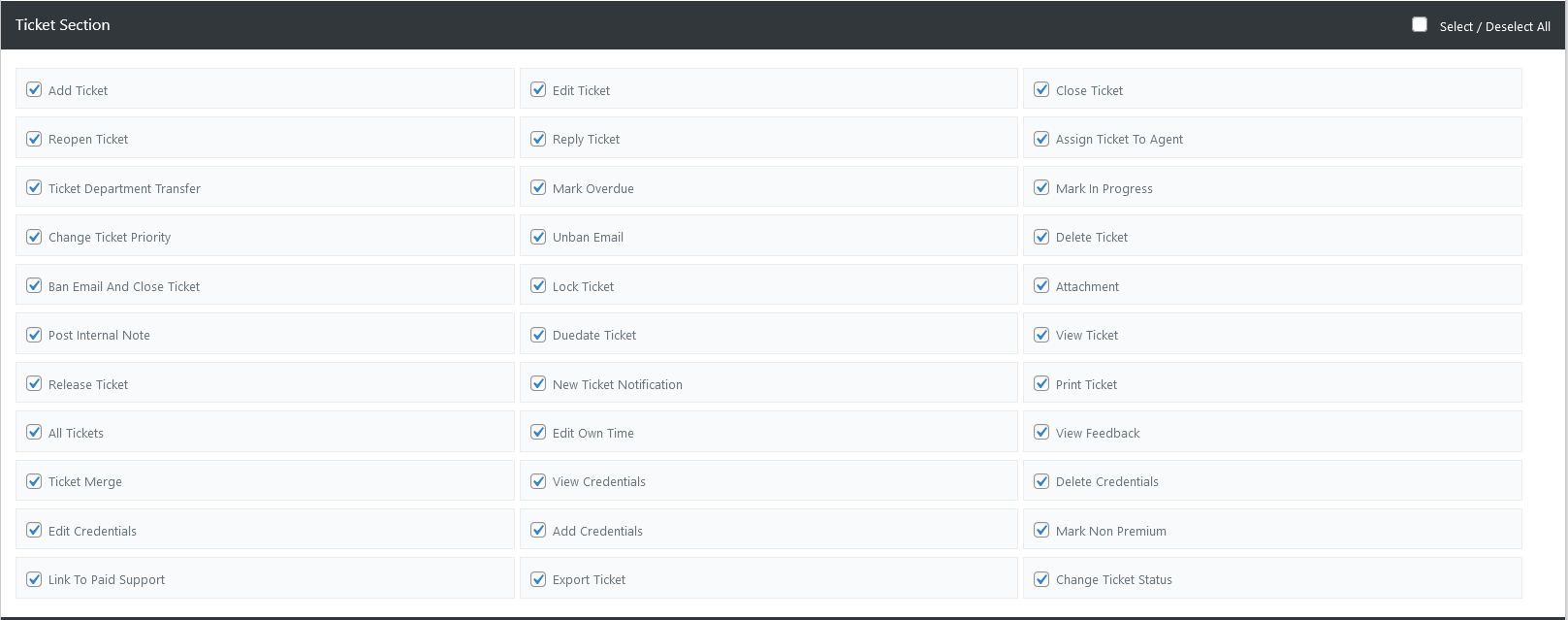
Next, the Ticket Section is where most of the action happens. This section governs the agent’s ability to interact with support tickets in various ways.
Add Ticket
This permission controls whether the agent can add tickets or not.
Edit Ticket
This permission controls whether the agent can edit a ticket or not.
Close Ticket
This permission controls whether the agent can close the ticket or not.
Reopen Ticket
This permission controls whether the agent can reopen a ticket or not.
Reply Ticket
This permission controls whether the agent can reply to a ticket or not. Enabling “Reply Ticket” allows agents to communicate directly with the user on ticket threads.
Assign Ticket To Agent
This permission controls whether the agent can assign a ticket to another agent or not.
Ticket Department Transfer
This permission controls whether the agent can transfer a ticket to another department or not.
Mark Overdue
This permission controls whether the agent marks the ticket as overdue or not.
Mark In Progress
This permission determines whether the agent can mark the ticket as in progress.
Change Ticket Priority
This permission determines whether the agent can change the ticket priority.
Unban Email
This permission controls whether the agent can unban a ticket email or not.
Delete Ticket
This permission determines whether the agent can delete the ticket.
Ban Email and Close Ticket
This permission controls whether the agent can ban email and also close the ticket or not.
Lock Ticket
This permission determines whether the agent can lock a ticket.
Attachment
This permission controls whether the agent can attach the files to the ticket form or not.
Post Internal Note
This permission controls whether the agent can use the post’s internal note or not.
Due Date Ticket
This permission controls whether the agent replies to a due date ticket or not.
View Ticket
This permission determines whether the agent can view the ticket.
Release Ticket
This permission controls whether the agent releases a ticket or not.
New Ticket Notification
This permission controls whether the agent gets a new ticket notification or not.
Print Ticket
This permission determines whether the agent can print the ticket.
All Tickets
This permission determines whether the agent can view all tickets.
Edit Own Time
This permission determines whether the agent can edit the won time.
View Feedback
This permission determines whether the agent can view feedback.
Ticket Merge
This permission determines whether the agent can merge a ticket.
This permission determines whether the agent can view user credentials.
This permission determines whether the agent can delete user credentials.
This permission determines whether the agent can edit user credentials.
This permission determines whether the agent can add user credentials.
Mark Non Premium
This permission controls whether the agent marks non-premium or not.
Link To Paid Support
This permission controls whether the agent links to paid support or not.
Export Ticket
This permission determines whether the agent can export a ticket.
Change Ticket Status
This permission determines whether the agent can change the ticket status.
Agent Section
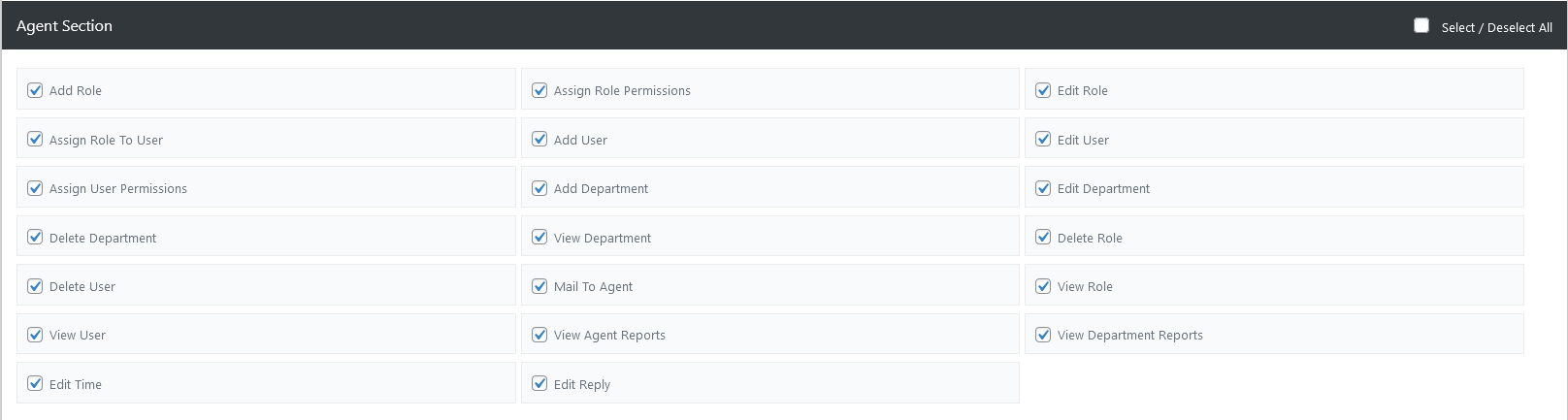
Add Role
This permissions control agent can add a role or not.
Assign Role Permission
This permission controls whether the agent assigns role permissions or not.
Edit Role
This permissions control agent can edit a role or not.
Assign Role To User
This permissions control agent can assign a role to the user or not.
Add User
This permissions control agent can add a user or not.
Edit User
This permissions control agent can edit the user or not.
Assign User Permission
This permission controls whether the agent assigns user permissions or not.
Add Department
This permission controls whether the agent can add a department or not.
Edit Department
This permission controls whether the agent can edit the department or not.
Delete Department
This permission controls whether the agent can delete a department or not.
View Department
This permission controls whether the agent can view the department or not.
Delete Role
This permission determines whether the agent can delete a role or not.
Delete User
This permission determines whether the agent can delete the user or not.
Mail to Agent
This permission determines whether the agent can mail to another agent or not.
View Role
This permission determines whether the agent can view the role or not.
View User
This permission determines whether the agent can view the user or not.
View Agent Reports
This permission determines whether the agent can view agent reports or not.
View Department Reports
This permission determines whether the agent can view department reports or not.
Edit Time
This permission determines whether the agent can edit the time or not.
Edit Reply
This permission determines whether the agent can edit the reply or not.
Knowledge Base Section

This permission controls whether the agent can add a category or not.
This permission determines whether the agent is allowed to add knowledge base.
This permission determines whether the agent is allowed to edit a category.
This permission determines whether the agent is allowed to edit the knowledge base.
This permission determines whether the agent is allowed to view the category.
This permission determines whether the agent is allowed to view the knowledge base.
This permission determines whether the agent is allowed to delete a category.
This permission determines whether the agent is allowed to delete a knowledge base.
FAQ Section

This permission determines whether the agent is allowed to add an FAQ.
This permission determines whether the agent is allowed to edit the FAQ.
This permission determines whether the agent is allowed to view the FAQ.
This permission determines whether the agent is allowed to delete the FAQ.
Download Section

This permission determines whether the agent is allowed to add a download.
This permission determines whether the agent is allowed to edit the download.
This permission determines whether the agent is allowed to view the download.
This permission determines whether the agent is allowed to delete the download.
Announcement Section

This permission determines whether the agent is allowed to add an announcement.
This permission determines whether the agent is allowed to edit the announcement.
This permission determines whether the agent is allowed to view the announcement.
This permission determines whether the agent is allowed to delete the announcement.
Mail Section

This permission determines whether the agent is allowed to mail system.
Help Topic Section

This permission determines whether the agent is allowed to add a help topic.
This permission determines whether the agent is allowed to edit the help topic.
This permission determines whether the agent is allowed to view the help topic.
This permission determines whether the agent is allowed to delete a help topic.
Canned Response Section

This permission determines whether the agent is allowed to add a canned response.
This permission determines whether the agent is allowed to edit the canned response.
This permission determines whether the agent is allowed to view canned responses.
This permission determines whether the agent is allowed to delete a canned response.
AI Reply Section

Allows agents to view and insert AI-suggested replies.
Grants permission to configure the AI mode for the entire ticket.
Let’s agents manage AI inclusion settings for specific replies.
Restricts agents to view AI suggestions only from tickets assigned to them, preventing access to replies from unrelated or unassigned tickets.

The ability to toggle each permission ensures tailored access. For bulk updates, a Select/Deselect All checkbox is available for each section. After configuring permissions, clicking the Save Permissions button finalizes the settings and applies them to the selected agent.