
Ticket History In The JS Help Desk!
Ticket History
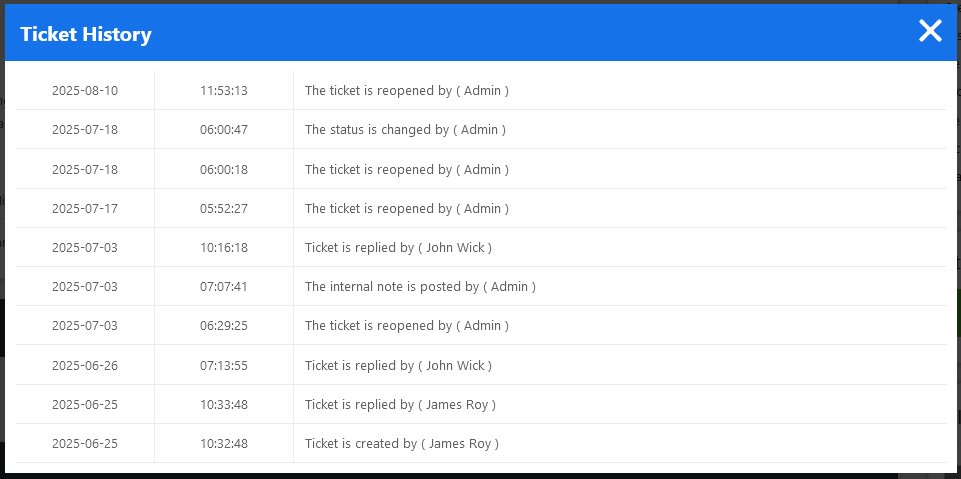
The Ticket History feature in your help desk plugin provides a complete chronological record of all interactions, updates, and actions related to a support ticket. Every time a reply is added, the status is changed, or an action is taken, it is logged in the ticket history. The ticket history pop-up has the action date, time, ticket action, and the action is taken by.
For example, if a user submits a ticket about a login issue, and later an agent updates the status from Open to In Progress, both actions appear in the Ticket History. When the agent replies, those interactions are also recorded. If the ticket is reassigned to another agent or department, that event is logged as well. This continuous record helps maintain accountability across the support team.
The Ticket History also captures system-generated actions, such as automatic replies or activities. This means you can see not only human actions but also automated processes that influenced the ticket’s flow. For instance, if a cron job closes inactive tickets after a certain period, this action will be noted in the history with the exact time and reason.
Each entry in the history typically includes a timestamp, the user or agent name, and a short description of the action performed. This makes it simple to identify when a response was made or how quickly a ticket was handled. Such data is invaluable for performance tracking and quality assurance.