
Email Templates In The JS Help Desk!
Email Templates
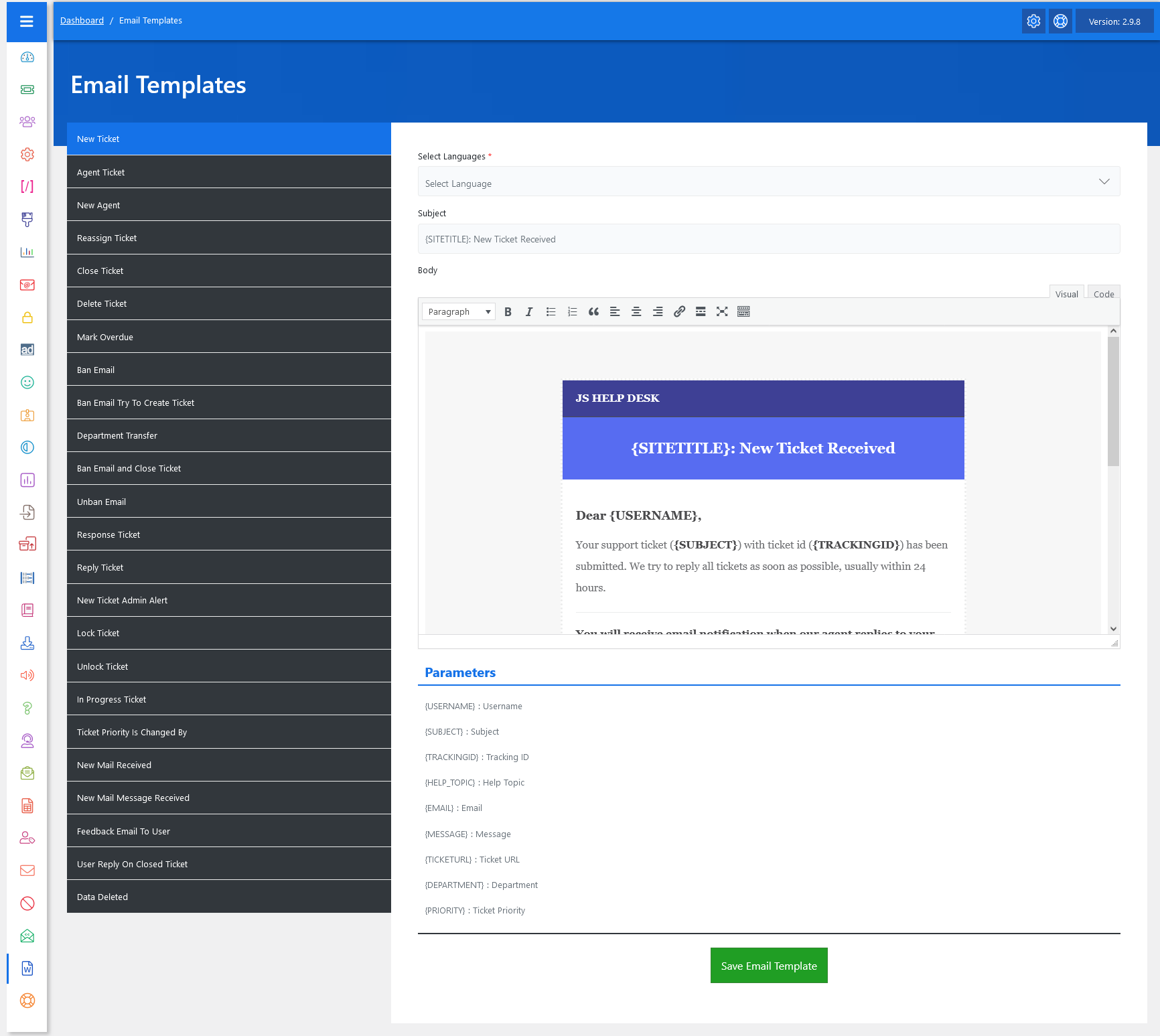
From your admin dashboard, navigate to the Admin Dashboard > Dashboard Menu > Email Templates. On the email templates page, you will find various options for the admin to manage email templates. All details about email templates and how administrators manage them are discussed here.
In JS Help Desk, the Email Templates feature allows you to manage and customize the automated email notifications sent to users, agents, and administrators. Instead of writing new messages from scratch every time, you can use predefined templates that automatically include dynamic details like ticket ID, subject, or username. This helps you maintain professionalism, save time, and ensure consistency across all communications. For example, when a user submits a ticket, the system instantly sends them a confirmation email based on the “New Ticket” template.

Another powerful aspect is the multi-language support. You can select a language from the drop-down list and create localized templates for users in different regions. For example, you might prepare one version of the “New Ticket” template in English and another in Spanish. When a Spanish-speaking user submits a ticket, they will automatically receive the notification in their preferred language. This helps build trust and improve communication across diverse user bases.
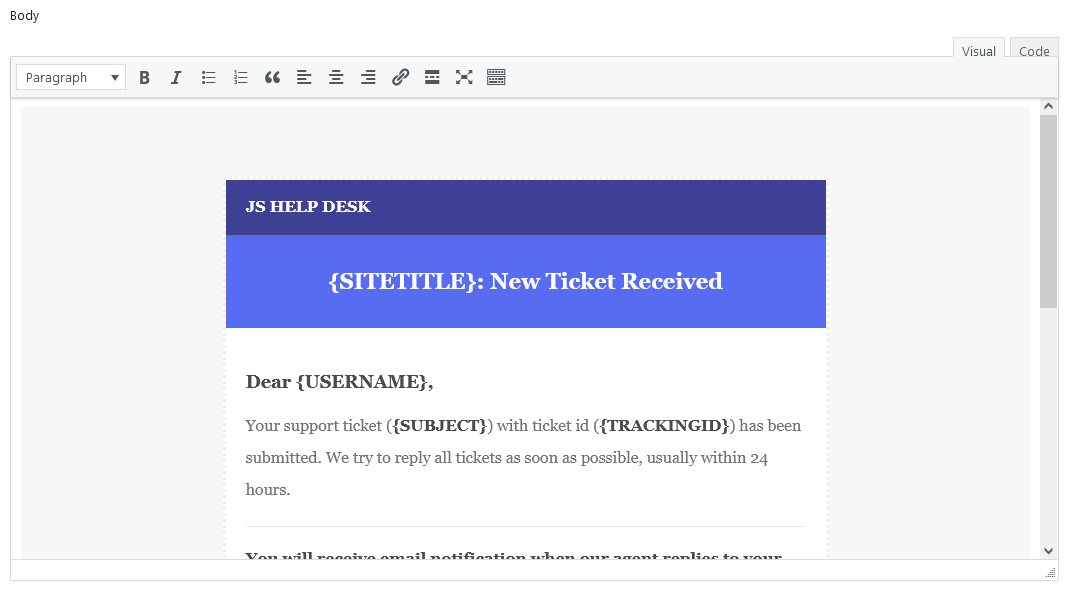
The template editor provides a rich-text editor, allowing you to format your messages with headings, bold text, links, and even branding elements like your company’s name. You can write in plain text for a minimal look or use styled HTML to make the emails more professional. For example, you might use a colored header with your help desk name, followed by a polite greeting and the ticket details. This not only delivers the necessary information but also reinforces your brand identity.
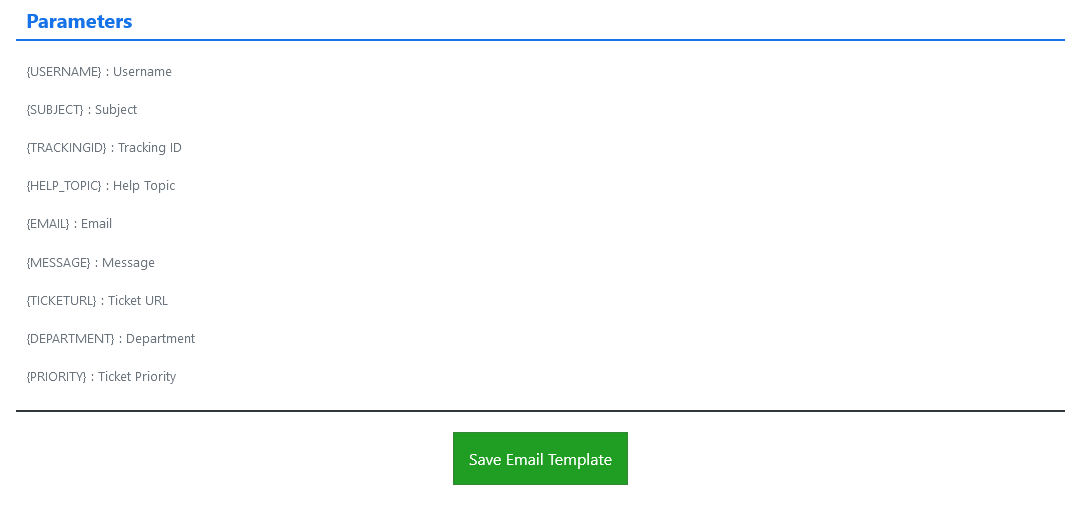
One of the key benefits of using these templates is the ability to insert parameters (placeholders) that get replaced with real ticket or user data when the email is sent. For instance, if your template contains {USERNAME} or {TRACKINGID}, JS Help Desk will automatically replace those placeholders with the actual username and the ticket’s tracking ID. This makes every email personalized and relevant without requiring manual edits. A message that looks generic in the template will appear fully tailored to the recipient.
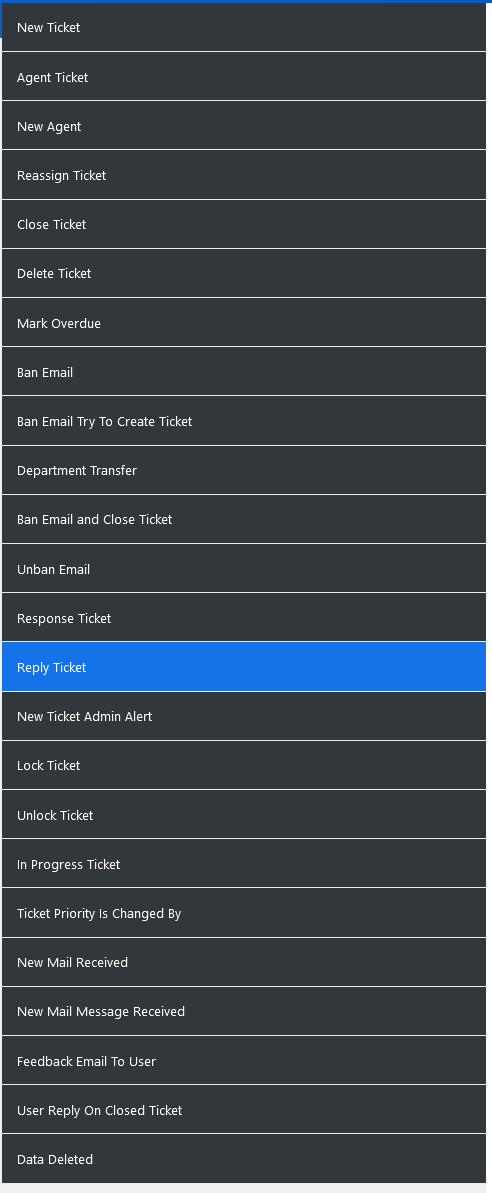
You can find a wide range of ready-to-use templates in the system, such as New Ticket, Agent Ticket, Department Transfer, Close Ticket, and many more. Each of these templates serves a specific scenario. For example, the “Department Transfer” template notifies the user and the new department when a ticket is reassigned, ensuring everyone stays informed. Similarly, the “Close Ticket” template informs the user that their issue has been resolved and the ticket is now closed.
Email Templates For New Tickets
Whenever a new ticket is created in the system. There is an email template that will be sent to the user and the admin. The parameters for the new ticket email templates are.
- USERNAME} : Username
- {SUBJECT} : Subject
- {TRACKINGID} : Tracking ID
- {HELP_TOPIC} : Help Topic
- {EMAIL} : Email
- {MESSAGE} : Message
- {TICKETURL} : Ticket URL
- {DEPARTMENT} :Department
- {PRIORITY} : Ticket Priority
Email Templates For Agent Tickets
Whenever a new agent ticket is created in the system. There is an email template that will be sent to the admin and the user. The parameters for the agent tickets email templates are.
- {USERNAME} : Username
- {SUBJECT} : Subject
- {TRACKINGID} : Tracking ID
- {HELP_TOPIC} : Help Topic
- {EMAIL} : Email
- {MESSAGE} : Message
- {TICKETURL} : Ticket URL
- {DEPARTMENT} : Department
- {PRIORITY} : Ticket Priority
Email Templates For New Agent
Whenever a new agent is created in the system. There is an email template that will be sent to the admin and the agent. The parameter for the new agent email template is.
- {STAFF_MEMBER_NAME} : Agent name
Email Templates For Reassigning Tickets
Whenever a reassigned ticket is created in the system. There is an email template that will be sent to the admin and the agent. The parameters for the reassigning tickets email template are.
- {SUBJECT} : Subject
- {TRACKINGID} : Tracking ID
- {STAFF_MEMBER_NAME} : Agent name
- {TICKETURL} : Ticket URL
- {DEPARTMENT} : Department
- {PRIORITY} : Ticket Priority
- {TICKET_HISTORY} : Ticket History
Email Templates For Closed Tickets
Whenever a ticket is closed, there is an email template that will be sent to the employer. The parameters for the closed ticket email templates are.
- {SUBJECT} : Subject
- {TRACKINGID} : Tracking ID
- {TICKETURL} : Ticket URL
- {FEEDBACKURL} : Feedback URL
- {DEPARTMENT} : Department
- {PRIORITY} : Ticket Priority
- {TICKET_HISTORY} : Ticket History
Email Templates For Delete Ticket
Whenever a ticket is deleted, there is an email template that will be sent to the user. The parameters for the delete ticket email templates are.
- {SUBJECT} : Subject
- {TRACKINGID} : Tracking ID
Email Templates For Mark Overdue
Whenever a ticket is marked overdue, there is an email template that will be sent to the user and the admin. The parameters for the mark overdue ticket email templates are.
- {SUBJECT} : Subject
- {TRACKINGID} : Tracking ID
- {TICKETURL} : Ticket URL
- {DEPARTMENT} : Department
- {PRIORITY} : Ticket Priority
- {TICKET_HISTORY} : Ticket History
Email Templates For Ban Email
Whenever a mail is banned, there is an email template that will be sent to the user and admin. The parameter for the ban email templates is.
- {EMAIL_ADDRESS} : Email Address
Email Templates For Ban Email: Try To Create a Ticket
Whenever a ban email is trying to create a ticket, there is an email template that will be sent to the user and admin. The parameter for the ban email templates is.
- {EMAIL_ADDRESS} : Email Address
Email Templates For Department Transfer
Whenever a department transfers, there is an email template that will be sent to the user and admin. The parameters for department transfer email templates are.
- {SUBJECT} : Subject
- {TRACKINGID} : Tracking ID
- {DEPARTMENT_TITLE} : Department
- {PRIORITY} : Ticket Priority
Email Templates For Ban Email and Close Ticket
Whenever an email is banned and a ticket is closed, there is an email template that will be sent to the user and admin. The parameters for the banned email and closed ticket are.
- {SUBJECT} : Subject
- {EMAIL_ADDRESS} : Email Address
- {TICKETID} : Ticket ID
- {DEPARTMENT} : Department
- {PRIORITY} : Ticket Priority
Email Templates For Unban Email
Whenever an email is unban, there is an email template that will be sent to the user and admin. The parameter for unban email is.
- {EMAIL_ADDRESS} : Email Address
Email Templates For Response Ticket
Whenever a ticket gets a response, there is an email template that will be sent to the user and admin. The parameters for the response ticket are.
- {USERNAME} : Username
- {SUBJECT} : Subject
- {TRACKINGID} : Tracking ID
- {EMAIL} : Email
- {MESSAGE} : Message
- {TICKETURL} : Ticket URL
- {DEPARTMENT} : Department
- {PRIORITY} : Ticket Priority
- {TICKET_HISTORY} : Ticket History
Email Templates For Reply Ticket
Whenever a ticket gets a reply, there is an email template that will be sent to the user and admin. The parameters for the reply ticket email templates are.
- USERNAME} : Username
- {SUBJECT} : Subject
- {TRACKINGID} :Tracking ID
- {EMAIL} : Email
- {MESSAGE} :Message
- {TICKETURL} : Ticket URL
- {DEPARTMENT} : Department
- {PRIORITY} : Ticket Priority
- {TICKET_HISTORY} : Ticket History
Email Templates For New Ticket Admin Alert
Whenever a new ticket is created, there is an email template that will be sent to the admin. The parameters for the new ticket admin alert are.
- {USERNAME} : Username
- {SUBJECT} : Subject
- {TRACKINGID} : Tracking ID
- {EMAIL} : Email
- {MESSAGE} : Message
- {TICKETURL} : Ticket URL
- {DEPARTMENT} : Department
- {PRIORITY} : Ticket Priority
Email Templates For Lock Ticket
Whenever a ticket is locked, there is an email template that will be sent to the admin and the user. The parameters for the lock ticket are.
- {USERNAME} : Username
- {SUBJECT} : Subject {TRACKINGID} :
- Tracking ID {EMAIL} :
- Email {TICKETURL} :
- Ticket URL {DEPARTMENT} :
- Department {PRIORITY} :
- Ticket Priority {TICKET_HISTORY} :
- Ticket History
Email Templates For Unlock Ticket
Whenever a ticket is unlocked, there is an email template that will be sent to the admin and user. The parameters for unlocking the ticket are.
- {USERNAME} : Username
- {SUBJECT} : Subject
- {TRACKINGID} : Tracking ID
- {EMAIL} : Email
- {TICKETURL} : Ticket URL
- {DEPARTMENT} : Department
- {PRIORITY} : Ticket Priority
- {TICKET_HISTORY} : Ticket History
Email Templates For In Progress Ticket
Whenever a ticket is in progress, there is an email template that will be sent to the admin and the user. The parameters for an in-progress ticket are.
- {SUBJECT} : Subject
- {TRACKINGID} : Tracking ID
- {TICKETURL} : Ticket URL
- {DEPARTMENT} : Department
- {PRIORITY} : Ticket Priority
- {TICKET_HISTORY} : Ticket History
Email Templates For Ticket Priority Is Changed By
Whenever a ticket priority is changed, there is an email template that will be sent to the admin and the user. The parameters for ticket priority have been changed.
- {SUBJECT} : Subject
- {TRACKINGID} : Tracking ID
- {PRIORITY_TITLE} : Priority
- {TICKETURL} : Ticket URL
- {DEPARTMENT} : Department
- {TICKET_HISTORY} : Ticket History
Email Templates For New Mail Received
Whenever a new email is received, there is an email template that will be sent to the agent. The parameters for new mail are.
- {SUBJECT} : Subject
- {STAFF_MEMBER_NAME} : Agent name
- {MESSAGE} : Message
Email Templates For New Mail Message Received
Whenever a new email message is received, there is an email template that will be sent to the agent. The parameters for the new mail message are received.
- {SUBJECT} : Subject
- {STAFF_MEMBER_NAME} : Agent name
- {MESSAGE} : Message
Email Templates For Feedback Email To User
Whenever there is a feedback email sent to the user, there is an email template that will be sent to the admin or agent. The parameters for the feedback email templates are.
- {USER_NAME} : User Name
- {TICKET_SUBJECT} : Ticket Subject
- {TRACKING_ID} : Ticket Tracking ID
- {CLOSE_DATE} : Close Date
- {DEPARTMENT} : Department
- {PRIORITY} : Ticket Priority
Email Templates For User Reply On Closed Ticket
Whenever a user replies to a closed ticket, there is an email template that will be sent to the admin and the user. The parameters for user reply on a closed ticket are.
- {TICKET_SUBJECT} : Ticket Subject
- {DEPARTMENT} : Department
- {PRIORITY} : Ticket Priority