
Auto Mark Ticket Overdue In The JS Help Desk!
Auto Mark Ticket Overdue
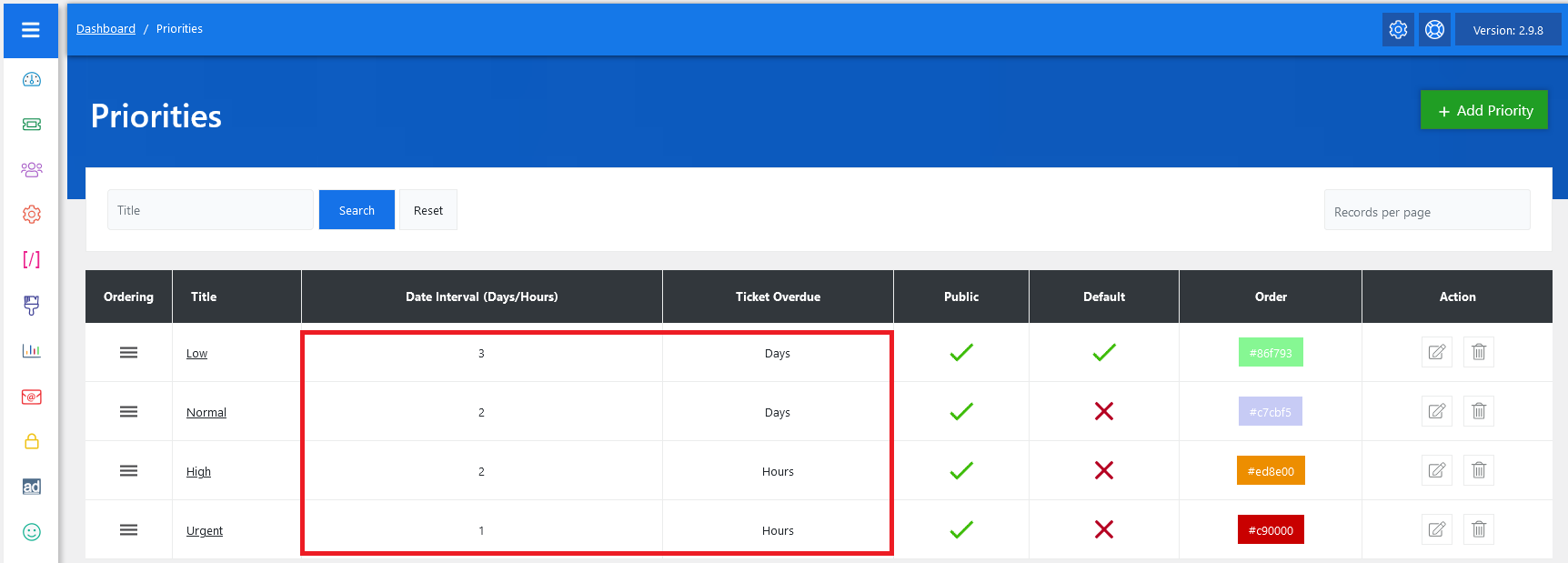
From your admin dashboard, navigate to the Admin Dashboard > Dashboard Menu > Priorities. On the priorities page, you will find various options for the admin to manage priorities. All details about auto-mark ticket overdue and how the admin manages them are discussed here.
In JS Help Desk, the Auto Mark Ticket Overdue feature is designed to help your support team manage time-sensitive tickets by automatically flagging tickets that have not been responded to or resolved within a specified timeframe. Admins can configure the time threshold for overdue tickets. For instance, you might set normal tickets to be marked overdue after 72 hours of inactivity, but high-priority tickets might be marked overdue after only 24 hours. This flexibility ensures the system reflects your company’s unique support policies.
When a user submits a ticket, it enters the system with its assigned priority and status. If the ticket is not answered or resolved within the configured time limit, the system automatically marks it as Overdue. For example, if the rule is set to 48 hours, and the ticket has been open with no agent response for two full days, the system changes its state to overdue.