
Email Settings In The JS Help Desk!
Email Settings
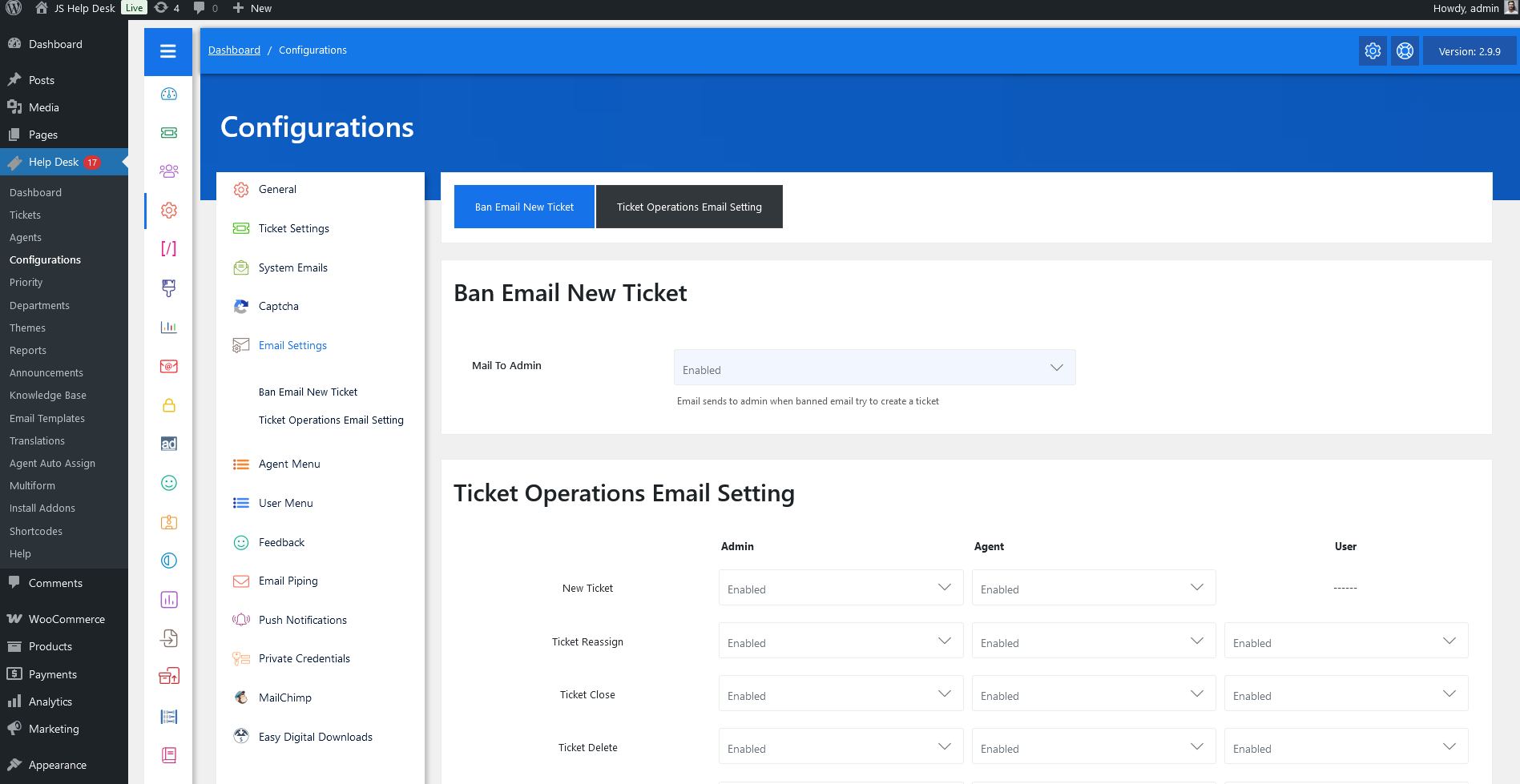
As an administrator, navigate to the Admin Dashboard > Dashboard Menu > Configurations > Email Settings. On the configurations page, you will find various configurations that the admin can use to manage the JS Help Desk Email.
Ban Email New Ticket

Emails are sent to the admin when a banned email tries to create a ticket.
Ticket Operations Email Setting
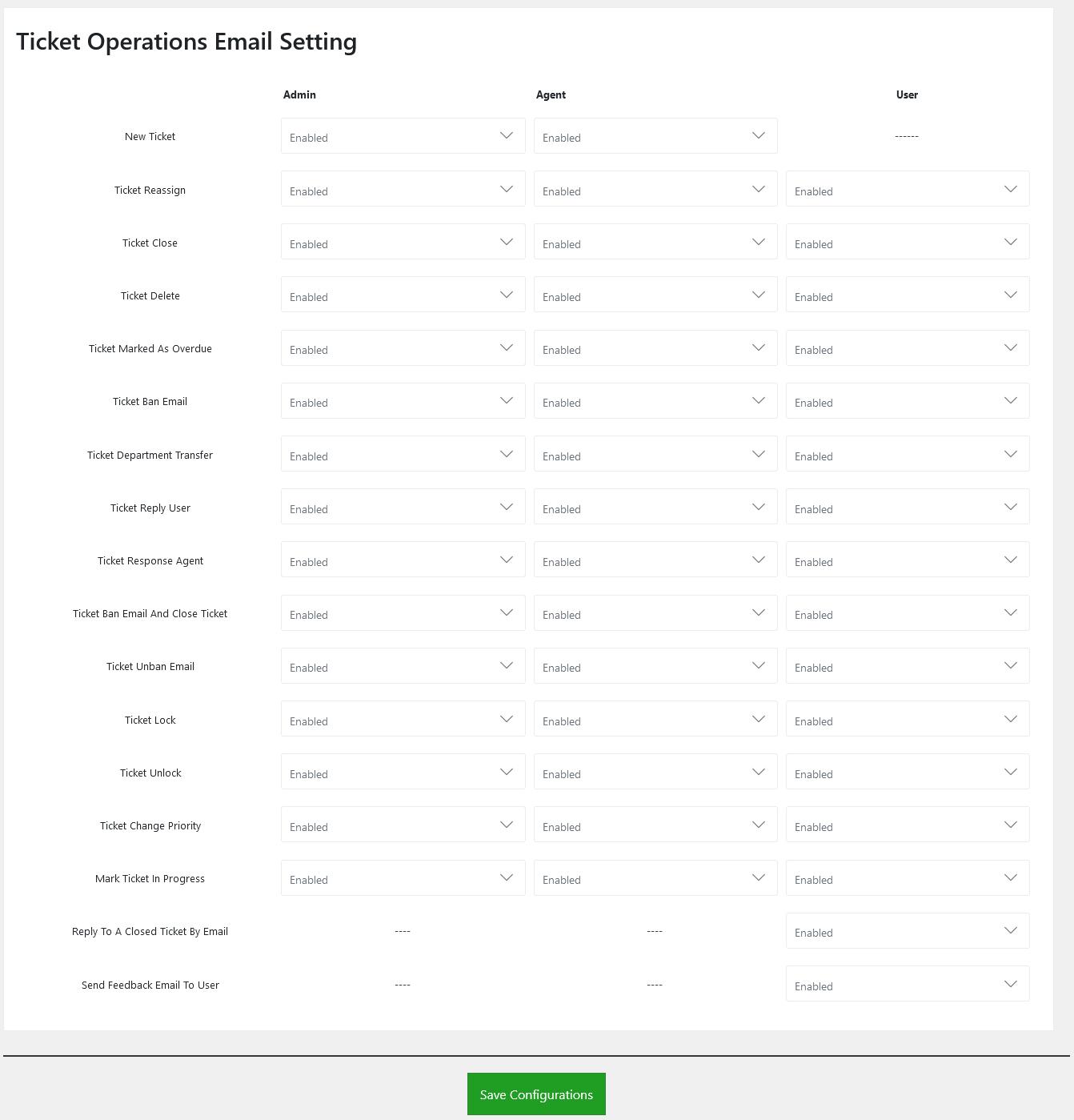
New Ticket
The new ticket creation email can be sent to the admin and agent. There are separate configurations to control the email alert for the admin and the agent.
Ticket Reassign
The ticket reassign email can be sent to the admin, agent, and user. There are separate configurations to control the email alert for admin, agent, and user.
Ticket Close
The ticket close email can be sent to the admin, agent, and user. There are separate configurations to control the email alert for the admin, agent, and the user.
Ticket Delete
The ticket delete email can be sent to the admin, agent, and user. There are separate configurations to control the email alert for admin, agent, and user.
Ticket Marked As Overdue
The ticket mark overdue email can be sent to the admin, agent, and user. There are separate configurations to control the email alert for admin, agent, and users.
Ticket Ban Email
The ticket ban email can be sent to the admin, agent, and user. There are separate configurations to control the email alert for admin, agent, and user.
Ticket Department Transfer
The ticket department transfer email can be sent to the admin, agent, and user. There are separate configurations to control the email alert for admin, agent, and user.
Ticket Reply User
The ticket reply user email can be sent to the admin, agent, and user. There are separate configurations to control the email alert for admin, agent, and user.
Ticket Response Agent
The ticket response staff email can be sent to the admin, agent, and user. There are separate configurations to control the email alert for admin, agent, and user.
Ticket Ban Email And Close Ticket
Ticket ban email and close ticket email can be sent to admin, agent, and user. There are separate configurations to control the email alert for admin, staff, and users.
Ticket Unban Email
The ticket unban email can be sent to the admin, agent, and user. There are separate configurations to control the email alert for admin, agent, and user.
Ticket Lock
The ticket lock email can be sent to the admin, agent, and user. There are separate configurations to control the email alert for admin, agent, and user.
Ticket Unlock
The ticket unlock email can be sent to the admin, agent, and user. There are separate configurations to control the email alert for admin, agent, and user.
Ticket Change Priority
The ticket change priority email can be sent to the admin, agent, and user. There are separate configurations to control the email alert for admin, agent, and user.
Mark Ticket In Progress
The ticket mark in progress email can be sent to the admin, agent, and user. There are separate configurations to control the email alert for admin, agent, and user.
Reply To A Closed Ticket By Email
Reply to a closed ticket by email can be sent to the user. There are separate configurations to control the email alert for the user.
Send Feedback Email To User
Send a feedback email to the user. There are separate configurations to control the email alert for the user.