
GDPR Fields In The JS Help Desk!
GDPR Fields
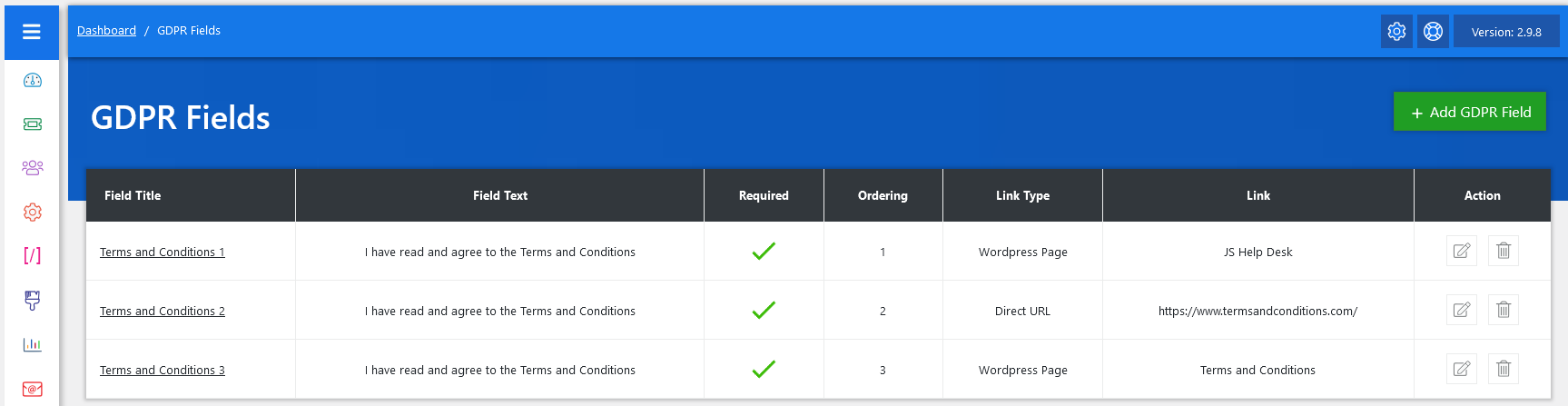
From your admin dashboard, navigate to the Admin Dashboard > Dashboard Menu > GDPR Fields. On the GDPR Fields page, you will find various options for the admin to manage GDPR fields. All details about the GDPR Fields and how the admin handled them are discussed here.
The GDPR Fields feature in JS Help Desk allows administrators to create, manage, and display custom consent checkboxes for users to agree to specific terms and policies. This functionality ensures that your help desk is compliant with data protection regulations, such as the General Data Protection Regulation (GDPR), by explicitly obtaining user consent before processing their data. It also provides a transparent way for users to understand what they are agreeing to before using your services.
Listing

On the GDPR Fields page, each field consists of the following elements: Field Title, Field Text, Required, Ordering, Link Type, Link, and Action.
- Field Title: The Field Title serves as the identifier for the consent requirement.
- Field Text: Field Text is the actual statement shown to the user.
- Required: The Required column determines whether the user must agree to this field before proceeding.
- Ordering: Controls the sequence in which the fields appear on the front end.
- Link Type: The Link Type specifies where the related policy or terms document is stored. You can link to either a WordPress Page, useful if you have an in-site document, or a Direct URL, which could be an external webpage.
- Link: The Link column provides the actual clickable resource for users to read the full details of the agreement.
- Action: You can update or delete the GDPR Field anytime using the action buttons on the right side.
Administrators can easily add a new GDPR field by clicking the + Add GDPR Field button.