
What can we help you with?
Add Agent In The JS Help Desk!
Add Agent
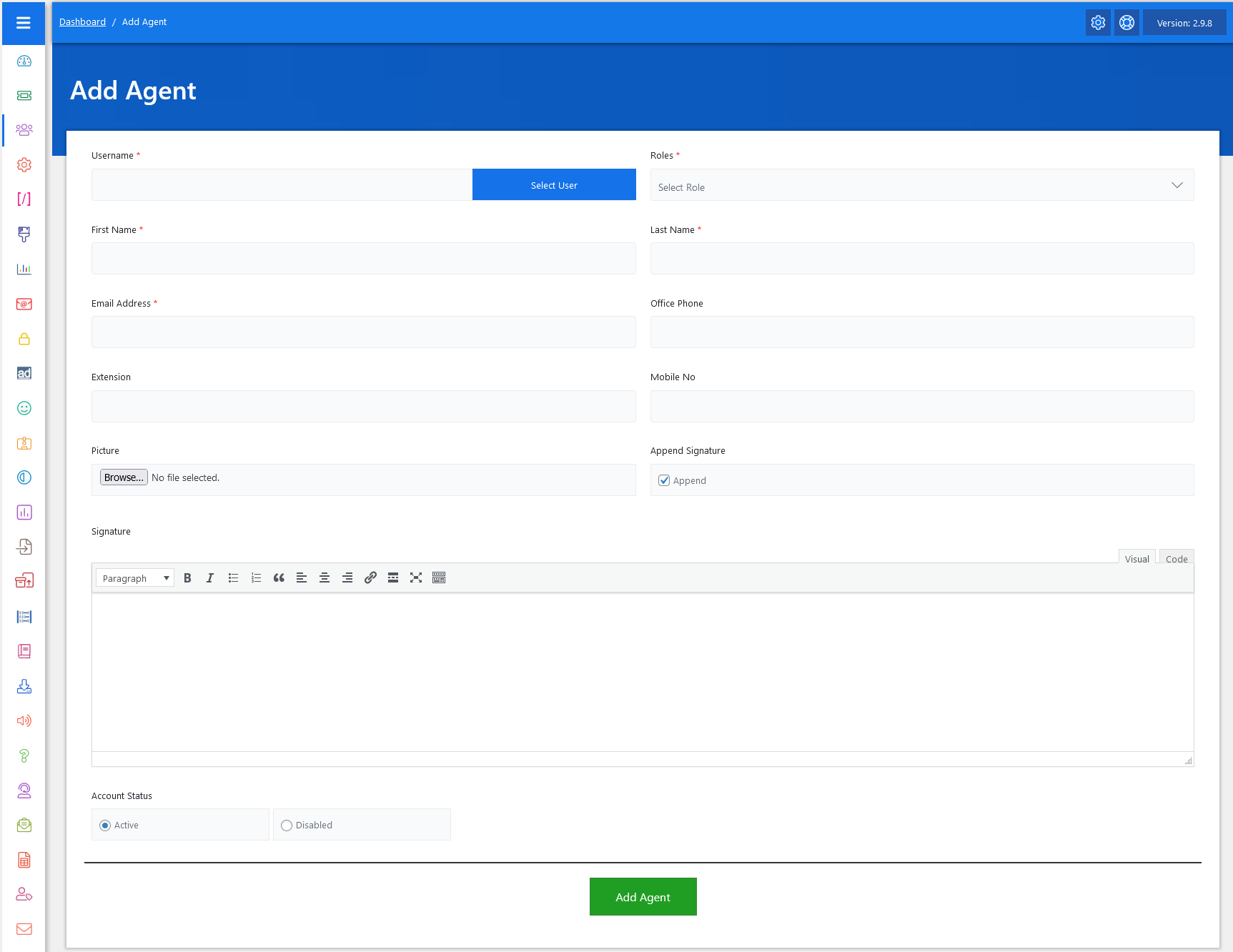
Now, let’s walk through the step-by-step process of adding an agent from the admin end. From your admin dashboard, navigate to the Admin Dashboard > Dashboard Menu > Add Agent > to start adding an agent effectively. On the ‘Add Agent’ form, we will provide all the necessary details for adding an agent.
- Username: You must first select a user from your existing user database by clicking the “Select User” button. This ensures the agent being added already has a valid account in the system.
- Role: Assign the user a role using the “Select Role” dropdown. This determines what permissions the agent will have.
- First Name: Enter the First Name of the agent.
- Last Name: Enter the Last Name of the agent.
- Email Address: Email Address is important for receiving ticket updates and notifications.
- Office Phone: This field is optional; enter the office phone.
- Extension: This field is optional; enter the extension.
- Mobile Number: This field is optional; enter the mobile number.
- Picture: There’s an option to upload a profile picture. This helps personalize the agent within the system and can also be displayed in customer communications, creating a more human connection. The system accepts standard image formats, such as JPG and PNG, and uploading is as simple as clicking “Browse” and selecting the file.
- Append Signature: If this is checked, the signature you write in the Signature box will be automatically added to every ticket response sent by the agent.
- Signature: You can switch between the visual editor and code editor for more formatting flexibility in the signature section.
- Account Status: The “Account Status” section. Here, you can choose whether the agent should be Active or Disabled.
After filling in all the relevant fields, click the green “Add Agent” button at the bottom of the form. The system will validate the inputs and create the new agent profile. If any required information is missing or incorrect, a notification will alert you to fix it before submission.